✨Explore the updated Follow GPS feature in GPX Viewer and GPX Viewer PRO on Android for intuitive navigation 🚴♂️ and dive into the powerful Create & Edit tool in GPX Viewer PRO to customize your routes for any adventure. 🌿🗺️
Try the updated Follow GPS feature in our Android apps
Our updated Follow GPS feature is here to enhance your navigation experience with GPX Viewer and GPX Viewer PRO.
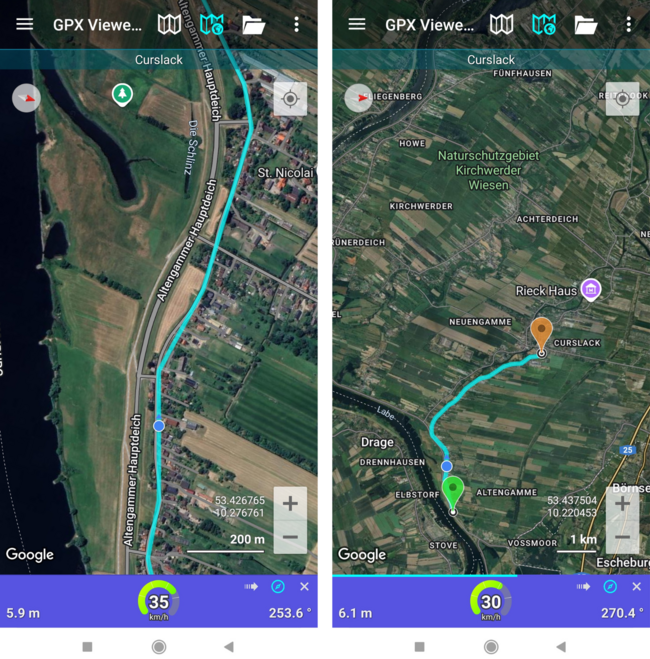
The violet background of the speed bar ensures you are always aware when the Follow GPS mode is active 🔵
Seamless return to your current location: Moved the map away from your current location? Simply tap the right arrow button on the speed bar to return.
Or you can just wait to be taken back automatically. Once a light blue progress line on the speed bar is complete, you’ll be right back to your location 📍
Easy activation of map rotation: Activate the Rotate map feature by tapping the compass button on the speed bar 🧭
Download GPX Viewer PRO, synchronize it with your Trackbook
account and take your trails with you on every adventure.
Want to share your experience with GPX Viewer or GPX Viewer PRO?🌲 Send a short story with photos to support@vecturagames.com. The best stories will be featured on our blog and social media 🏞️ Inspire others with your adventures 📸